
Apex Health: Sleep & Recovery
Your body, decoded daily.
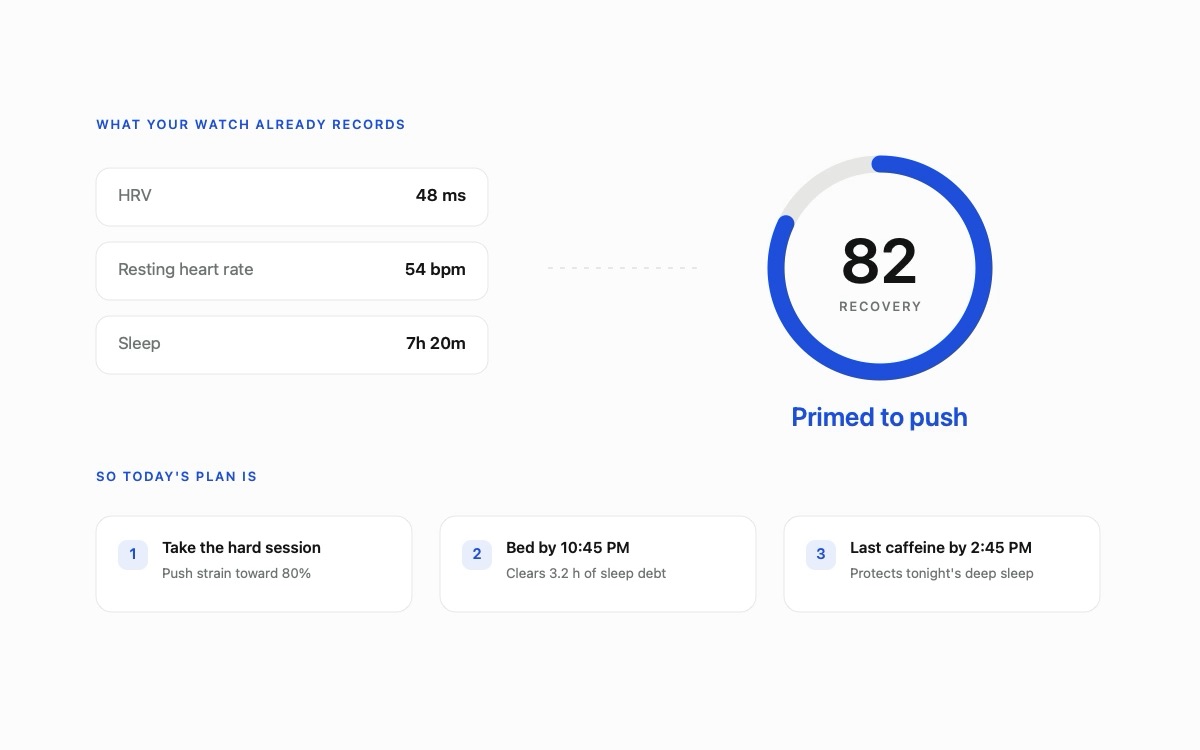
Apex Health: Sleep & Recovery reads the Apple Health data you already generate (HRV, resting heart rate, sleep, workouts) and turns it into one clear verdict every morning: how hard to push, when to rest, and why. An on-device AI coach checks your own numbers before it answers. Nothing leaves your phone.
01 What Apex Health: Sleep & Recovery does
One verdict. Then the whole picture.
Trackers hand you charts and leave the thinking to you. Apex Health: Sleep & Recovery reads your numbers and makes the call: a single daily readiness verdict, backed by coaching for hydration, strain, sleep, stress, and training load. Everything that can run on the device, does.
Daily recovery verdict
A single readiness score from HRV, resting heart rate, and sleep, with one plain-language line telling you how hard to push today.
Strain and training load
Tracks the load of every workout against your personal baseline and tells you when to back off before you dig a hole.
Sleep, scored honestly
Duration against your personal need, plus efficiency and deep/REM composition, with an oversleep penalty so more isn't blindly better.
Energy and live stress
A body-battery reading of what you have left, plus an intraday stress signal from real-time heart-rate elevation, not just the inverse of recovery.
Apex Age healthspan
Turns VO₂max, resting heart rate, HRV, sleep, and activity into a biological-age estimate: how old your body reads, and why.
On-device AI coach
Ask Apex Health: Sleep & Recovery anything about your day. It reads your own numbers and answers in natural language, all on Apple's on-device Foundation Models.
02 What's inside
Version 1.0: the numbers, and what they mean.
Every score is derived from data already in Apple Health and computed on your own device. The metric screens show how each one was built, so you can disagree with it.
- Five scores and a daily brief. Strain, Recovery, Sleep, Stress and Energy, each computed from your own Apple Health data, with a plain language brief you can regenerate.
- Sleep debt you can clear. A rolling 14 night debt balance that credits catch-up sleep, a learned sleep need, bedtime consistency and social jetlag, plus a sleep debt plan.
- Overnight vitals against your own baseline. Resting heart rate, wrist temperature, HRV, respiratory rate, blood oxygen and heart rate dip, each shown against your usual range rather than a population average.
- Apex Age. A wellness estimate with its own history, a month view and personal bands, set beside your calendar age.
- What things actually cost you. Alcohol and caffeine logging alongside your own numbers, and nutrition read from Apple Health.
- Heart rate zones and cardio load. How your week distributed across the five zones, with cardio load, VO2 Max trend, running form and cycling power read from workouts your Apple Watch already recorded.
- Hydration you can scan. A water goal that adapts to the weather and the day's activity. Scan the drink or its label with the camera, or measure a container. Drinks are written back to Apple Health.
- Watch complications and Control Center. Recovery and hydration on your watch face, and controls to log water or open Apex Health: Sleep & Recovery from Control Center, the Lock Screen, or the Action button.
- App Lock and a data inventory. Lock Apex Health: Sleep & Recovery behind Face ID or a passcode, and see an itemized list of everything stored on your device, with a one tap erase.
Apex Health: Sleep & Recovery is in TestFlight beta and is not on the App Store yet. It requires iOS 17 or later and watchOS 10 or later. The workout effort card needs iOS 18, and the on-device AI coach needs iOS 26 on a supported device.
03 The scores, explained
Transparent numbers, not black boxes.
Every score is a transparent estimate built from your own data. Here is what each one actually measures.
Recovery
Compares your HRV and resting heart rate against an exponentially-weighted baseline that excludes the current day, then blends in sleep, making the score more responsive and less skewed by outliers.
Strain
Computed against your personal 30-day activity baseline on a diminishing-returns curve, so an average day reads mid-range and only genuinely hard days approach the ceiling.
Sleep
Blends duration against a personalized need (shared with the Sleep Coach), efficiency, and deep/REM composition, with an oversleep penalty and no double-counting between iPhone and Apple Watch.
Energy
A running read of what you have left in the tank that drains proportionally to how depleted you already are, so late-day exertion costs more.
Stress
A live signal derived from recent heart-rate elevation, an independent reading, not simply the inverse of your recovery score.
Apex Age
Starts from your date of birth and adjusts using VO₂max, resting heart rate, HRV, sleep, and activity. Correlated cardio factors are dampened and the total adjustment is capped, so fitness isn't triple-counted.
04 Everyday coaching
The small things, handled.
Hydration coaching
A daily water goal that adapts to the weather and to the day's active energy, with one-tap logging from the app, your wrist, or a widget.
Journal & drink scanning
Log a drink in seconds, or scan the drink or its label with the camera. Frames are read on the device and never stored or uploaded. Food and nutrition are read from Apple Health.
Apex Coach
Natural-language coaching and insights that read your own numbers first, powered entirely by Apple's on-device Foundation Models.
05 The Toolkit
Focused coaches, one tap away.
Beyond the daily verdict, Apex Health: Sleep & Recovery includes a toolkit of focused coaches and utilities for when you want to go deeper.
06 On every screen you own
Wrist, Home Screen, Lock Screen.
Apple Watch app & complications
Recovery at a glance, plus one-tap water and journal logging that syncs back through Apple Health. Watch face complications and Smart Stack widgets put recovery and hydration on your wrist, scored on the watch itself with no phone round-trip.
Widgets, controls & Live Activities
Home Screen widgets and Live Activities for your recovery score and hydration, plus Control Center, Lock Screen, and Action button controls to log water or jump straight to a screen. Ask Siri for your strain, sleep, or energy. Day-scoped totals reset cleanly at midnight, and background delivery keeps everything fresh without opening the app.
07 Privacy
Nothing leaves your phone.
Your health data is read with your permission, processed on your device, and stays there. Truestep runs no server that receives, stores, or processes your health data. There is nothing to breach, nothing to sell, and nothing to subpoena.
No ads, no tracking
No analytics, no advertising, and no third-party tracking SDKs of any kind.
Never sold, never shared
We do not sell, rent, or share personal data, not with advertisers, brokers, or anyone.
On-device AI
The coach runs on Apple's on-device models. Your questions and answers stay on your hardware.
One coarse weather call
The only network request sends approximate (~1 km rounded) coordinates to the keyless Open-Meteo API for hydration. Nothing about you is attached.
App Lock, and a real inventory
Lock Apex Health: Sleep & Recovery behind Face ID, and see an itemized list of everything stored on your device with measured sizes, plus a one-tap erase. In the app switcher, your data is replaced by the Apex Health: Sleep & Recovery mark.
To keep a drink you deleted from reappearing after a reinstall, Apex Health: Sleep & Recovery stores a small list of deleted-item markers (random identifiers only, no health data) in your own iCloud key-value storage. Full details are in the Apex Health: Sleep & Recovery Privacy Policy.
08 Requirements
What you need.
- iPhone on iOS 17 or laterThe main app, journal, coach, and toolkit.
- Apple Watch on watchOS 10 or laterOptional, but recommended for overnight recovery data.
- Apple Health dataHRV, resting heart rate, and sleep are needed to compute recovery.
- Free for everyoneNo subscriptions and no in-app purchases.
09 How Apex Health: Sleep & Recovery compares
Free, where the others charge.
Recovery bands and smart rings put the same daily verdict behind hardware to buy and a subscription to keep paying. Apex Health: Sleep & Recovery runs on the Apple Watch you already own, on-device, for free. See the full breakdowns:
10 FAQ
Questions, answered.
How is the recovery score calculated?
Apex Health: Sleep & Recovery compares your heart rate variability and resting heart rate against an exponentially-weighted personal baseline that excludes the current day, then blends in sleep. The result is a single readiness verdict, computed entirely on your device.
Which devices and versions does Apex Health: Sleep & Recovery support?
iPhone on iOS 17 or later and Apple Watch on watchOS 10 or later, with Home Screen widgets and Live Activities. A few extras need a newer system: the workout effort card needs iOS 18, and the on-device AI coach needs iOS 26 on a supported device. Data comes from Apple Health, so anything that writes to Apple Health works with Apex Health: Sleep & Recovery.
Do I need an Apple Watch?
Not strictly, but recovery scores rely on overnight heart and sleep signals, especially HRV recorded during sleep. An Apple Watch, or any tracker that writes that data to Apple Health, is what makes the daily verdict possible.
Can Apex Health: Sleep & Recovery tell me I am getting sick?
No, and it does not try to. The app shows each overnight vital, resting heart rate, wrist temperature, HRV, respiratory rate and blood oxygen, against your own usual range, so you can see when something sits outside it. Reading that pattern is your job, and a doctor's. It is not a medical device and diagnoses nothing.
Is my health data private?
Yes. Apex Health: Sleep & Recovery processes your health data on your device. It is never uploaded to our servers, never sold, and never used to train models. The only network request sends coarse coordinates to a keyless weather API to personalize your hydration goal. You can lock the app behind Face ID, and see an itemized inventory of everything stored locally with a one-tap erase. See the Privacy Policy for the full detail.
Is Apex Health: Sleep & Recovery free?
Yes. Apex Health: Sleep & Recovery is completely free for everyone, with no subscriptions and no in-app purchases. Joining the TestFlight beta is free as well.
Is this medical advice?
No. Apex Health: Sleep & Recovery provides general wellness and fitness information computed from your own data. It is not a medical device and does not provide diagnosis or treatment. Always consult a qualified professional for medical concerns.
Wake up to a verdict, not a spreadsheet.
Apex Health: Sleep & Recovery is coming to the App Store for iPhone and Apple Watch. Try it early on TestFlight.